Magento 2 (Adobe Commerce)
Before you start
Important
A Checkout Portal account is needed. Please refer to the guide:
-
How to create a test account for Checkout and the Easy Portal.
-
Your integration keys for the website you are developing. Need help?
Magento 2 (Adobe Commerce) Marketplace
Magento 2 (Adobe Commerce) Github
Overview
You can see below all the payment methods offered by Nexi Checkout. This list refers to all markets.
Depending on your country or region, the list may vary. If you are uncertain about a specific payment method and whether it is available in your country or region, please contact Support for more information.
What the module does:
The Nexi Checkout module integrates Magento 2 with Nexi Checkout (Payment API v1). In short, it allows you to:
- Offer Hosted Checkout (redirect to a Nexi‑hosted payment page).
- Offer Embedded Checkout (Nexi payment form rendered inside Magento checkout via SDK).
- Create and manage payments in Nexi using the official Payment API v1.
- Keep Magento orders in sync with Nexi via webhooks (authorization, capture, refund, cancel).
- Optionally support payment method splitting (if configured).
From a merchant’s point of view, the typical flow is:
- Install and enable the module.
- Configure API credentials (API key, checkout key, environment, country, etc.).
- Webhook endpoint and secret are configured in Magento and sent automatically to Nexi when a payment is created (no manual setup in the Nexi portal is required).
- Choose integration type (Hosted / Embedded) and payment action (authorize / authorize + ure).
- Test on a staging/QA environment.
- Switch to live mode for production.


Requirements
Integrate Nexi Checkout with your Magento2 / Adobe Commerce store. The module supports embedded and hosted checkout, payment management in Magento Admin, and payment status updates through webhooks.
Requirements
Before installing the module, make sure you have:
-
A Nexi merchant account with access to Nexi Checkout – Payment API v1.
-
API Key and Checkout Key issued by Nexi (test and/or live).
-
A webhook secret / shared key that you configure in Magento and which is automatically sent to Nexi when payments are created (no extra portal configuration required).
-
Magento 2 environment that meets the module’s Magento and PHP version requirements.
-
Access to install modules either via Composer or direct deployment into app/code.
-
PHP 8.1 with the cURL extension
-
Magento Framework
-
Use a PHP version supported by your Magento installation.
For exact compatibility (Magento version, PHP version), refer to the module’s composer.json and the Nexi’s main documentation.
Key Features
Shop Features
- Seamless checkout experience with multiple payment options.
- Checkout for guests and registered customers.
- Embedded checkout for an optimized user experience. Users are not redirected outside Adobe Commerce.
- Optional payment method splitting to display individual payment options at checkout.
- A smart mix of payment methods to suit all preferences.
- Multiple checkout languages and currencies for selling in your domestic market and abroad.
Administration Features
- Quick setup and flexible configuration.
- Automatic capture or subsequent capture through Magento's payment workflow.
- Intuitive order management with synchronized payment status via webhooks.
- Full and partial captures and refunds, plus cancellation of reserved payments.
- Webhook handling for reservation, charge, refund, and cancellation events.
- Compatible with discounts, tax (VAT) and shipping variants
- Intuitive order management with synchronized payment status via webhooks.
- Compatible with discounts, tax (VAT) and shipping variants.
Installation
Follow the steps below to install and enable the Nexi Checkout module in Magento 2.
Step 1: Install the module
You have two options when installing the Checkout module.
Alternative 1: Using composer
** It is strongly recommended to have cleanup of Pending Payment orders active in Sales > Orders, Orders Cron Settings > Pending Payment Order Lifetime (minutes) **
Install the module via composer at your magento site by running the following commands
$ composer require --no-dev nexi-checkout/adobe-commerce-checkout
Alternative 2: Manual upload
Another option is to manually upload the file to your Magento site:
- Download the latest Nexi Checkout module from GitHub: https://github.com/Nets-eCom/Magento2_easy/releases
- Unzip the file and upload the content to your Magento site via FTP, into the directory /app/code/Nexi/Checkout. Please create the folder /Nexi/Checkout first time you install the plugin.
Enable the Nexi Checkout module in Magento by running the following commands:
$ php bin/magento module:enable clear-static-content Nexi_Checkout $ php bin/magento setup:upgrade
The module is now installed and ready to be configured in the Magento administation panel.
For production mode, run dependency injection compilation and deploy static content as part of your normal deployment process:
$ bin/magento setup:di:compile $ bin/magento setup:static-content:deploy
Configuration
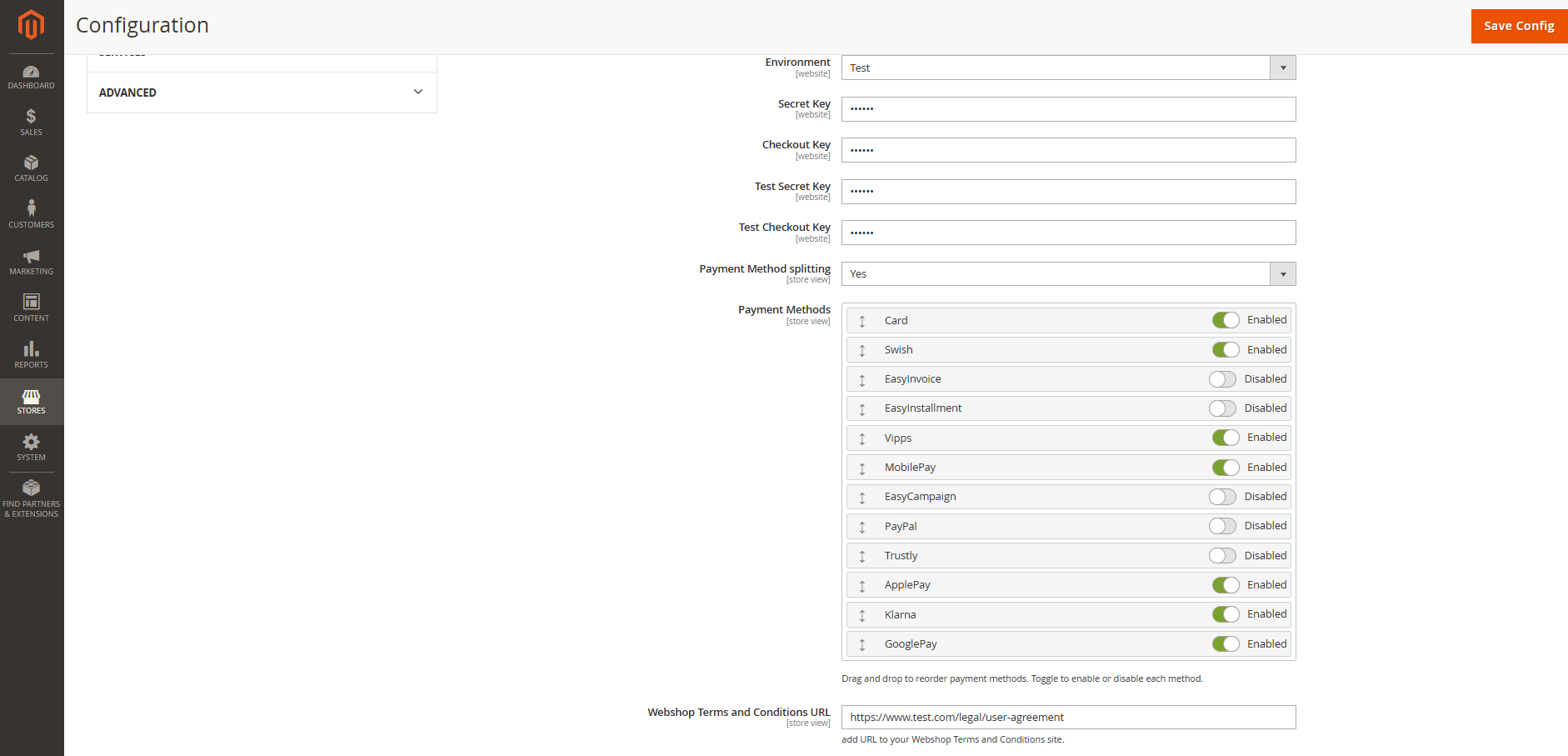
In Magento Admin, open Stores → Configuration then Sales → Payment Methods → Nexi Checkout.
- Set Enabled to Yes and modify the checkout Title if needed.
- Configure Is Auto Capture and New Order Status for your order workflow.
- Select Test or Live under Environment.
- Enter the corresponding credentials: Secret Key and Checkout Key for live payments and Test Secret Key and Test Checkout Key for testing payments.
- Optionally enable Payment Method splitting, select the available methods, and drag them into the desired order.
- Enter the Webshop Terms and Conditions URL and Payment Terms and Conditions URL.
- Choose Embedded Checkout or Hosted Checkout under Integration type.
- Save the configuration and use Test Connection to verify connectivity.


Webhook configuration
To keep orders in sync (authorization, charge/capture, refund, cancel), Nexi sends webhooks to Magento.
Magento side
The module exposes a webhook endpoint: https://nexi/payment/webhook The controller validates an Authorization header using the configured Webhook Secret. Incoming webhook payloads are processed by the handlers.
Make sure:
Your Magento storefront URL is publicly reachable from Nexi. Any reverse proxies / firewalls allow POST requests from Nexi to /nexi/payment/webhook.
Nexi portal side
In normal operation you do not need to manually configure the webhook URL or secret in the Nexi merchant/developer portal. The Nexi Checkout module sends the callback URL and secret to Nexi as part of the Payment API integration when payments are created.
You can still use the Nexi portal to:
Verify that webhooks are registered and active. Monitor delivery history and troubleshoot failed webhook calls.
Choosing integration type
The module supports two main integration types (configured in admin and exposed to JS via window.checkoutConfig.payment.nexi.integrationType ):
Embedded Checkout
- The customer stays on the Magento checkout page.
- Frontend calls /nexi/.../payment-initialize to create a Nexi payment for the quote.
- The Nexi SDK renders an embedded frame inside the checkout.
- After the customer confirms, frontend calls /nexi/.../payment-validate with cartId + paymentId , then runs Magento place order.
- Webhooks keep the resulting order in sync (authorization, capture, refund).
Hosted Payment Page
- Magento uses the standard place order action
- During placeOrder , the module calls Nexi Payment API to create a hosted payment,
- stores paymentId on the order, and returns redirect_url .
- Frontend redirects the customer to Nexi’s hosted checkout page.
- After payment, Nexi redirects back to Magento and sends webhooks.
Order Management
Order management
It's possible to manage orders directly in the Magento administration panel:
Navigate to Sales > Order > View.
-
Click on an order line to access order details.
-
Choose your desired action, refund/partial refund, or update the order status. The Checkout plugin will synchronize automatically. The payment status will also be updated in Checkout portal.
For information
All transactions performed by Nexi Group are accessible in Checkout Portal.


Payment Method Splitting
To configure payment method splitting, select the option, and choose the payment methods that you wish to display.
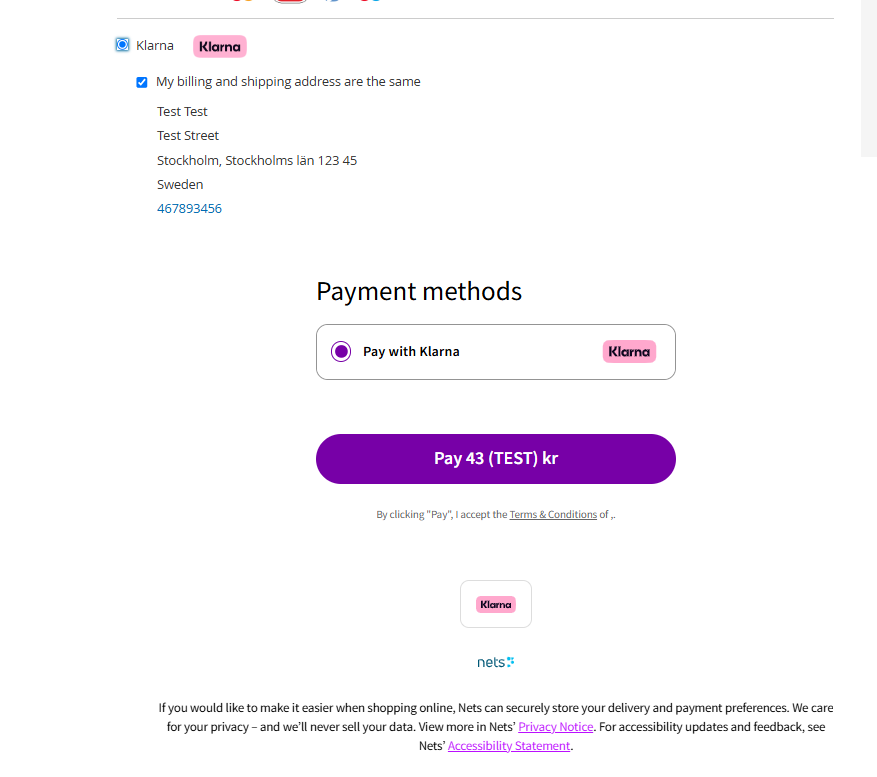
If payment method splitting has been configured, the method chosen by the consumer will display for the consumer to confirm.


Installation checklist
Customer installation checklist
Use this checklist when installing the module for a merchant:
Code deployment
- Module code present under app/code/Nexi/Checkout or installed via Composer.
- bin/magento module:enable Nexi_Checkout executed.
- bin/magento setup:upgrade executed.
- (Production) bin/magento setup:di:compile and static content deploy executed.
Basic configuration
- Environment (Test/Live) set correctly.
- API Key and Checkout Key configured for that environment.
- Integration Type chosen (Embedded or Hosted) as per business decision.
- Payment Action configured (Authorize vs Authorize + Capture).
- Country / currency settings validated.
Webhook setup
- Webhook Secret present in Magento configuration (auto‑generated on setup:upgrade or
- manually set if rotated).
- Storefront URL is publicly reachable and firewalls / proxies allow POST requests from Nexi to /nexi/payment/webhook
Testing
- Place a test order in Test environment using Hosted Checkout.
- Verify order status transitions (authorization → capture) in Magento.
- Verify that webhooks are logged and that invoices/credit memos behave as expected.
- Repeat for Embedded Checkout if used.
Go‑live
- Switch Magento configuration to Live environment.
- Update API Key and Checkout Key to live values.
- (Optional) Rotate Webhook Secret according to your security policy (not required for switching from test to live).
- Place a low‑value live transaction to confirm end‑to‑end behavior.
Troubleshooting
Below are some of the most common configuration errors, their cause and steps that you can follow to solve them.
Nexi Group payment window is blank
- Ensure your integration keys in the Nexi Group app settings are correct and do not contain additional blank spaces.
- Temporarily deactivate third party plugins that might affect the functionality of the app.
- Check if there are any temporary technical inconsistencies: https://easy-status.developers.nets.eu/
Payments in live mode don't work
- Ensure you have an approved Live Checkout account for production.
- Ensure your Live Checkout account is approved for payments with the selected currency.
- Ensure payment method data is correct and supported by your Checkout agreement.